
inDrive. Rides with fair fares
® SUOL INNOVATIONS LTDMaps & Navigation
4.811.28K Reviews
- Version
- Varies With Device
- Installs
- 100.00M
- Age Rating
- Everyone
Screenshots
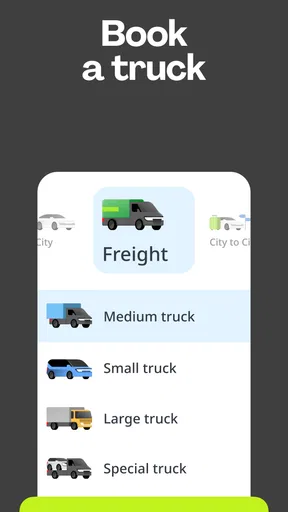
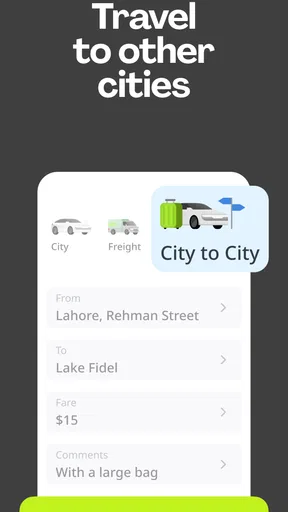
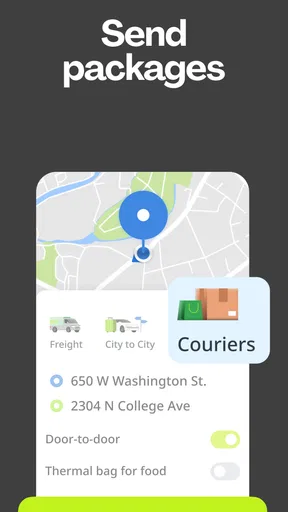
Our Review of inDrive. Rides with fair fares
 Analysis by Appyee
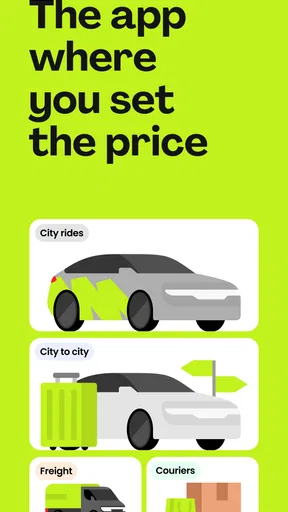
I find ride-hailing apps most useful when they make the next step obvious: where I’m going, what I’m offering, and whether a driver is willing to take the trip. inDrive puts the fare conversation up front rather than treating the price as fixed, which can feel refreshingly direct if you prefer to have a say before you get in the car. It is a free maps and navigation app from ® SUOL INNOVATIONS LTD, rated for Everyone, and it is aimed at everyday rides rather than complicated trip planning.
What to expect before you request a ride
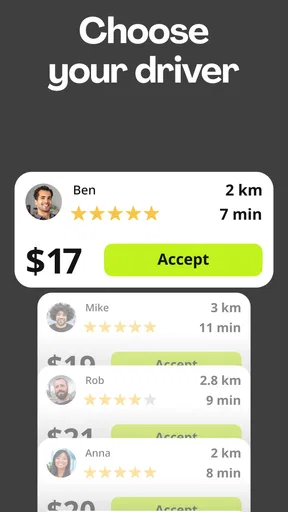
The main difference you notice is that you suggest a fare and wait for drivers to respond. That gives you more agency than the standard ride-hailing flow, but it also means the result is not always instant. A driver may accept, make a counteroffer, or pass, so I would treat the first amount as the start of a practical exchange, not a guaranteed booking price.
That trade-off shapes the app’s best use. If your plans are flexible and you have a little time to compare responses, the negotiation can feel useful. If you need a car immediately at a busy time, a service that assigns a driver at a displayed fare may be the less stressful choice. The app has grown to over 100 million installs and holds a 4.8 average from around 15 million ratings, but those broad figures don’t replace checking whether there are active drivers near your pickup point.
Getting ready for a first request
For your first meaningful try, keep the trip simple: choose a pickup point you can identify easily, enter a clear destination, and consider what fare feels reasonable before you submit it. That last step matters. Setting an amount without thinking about your route or how quickly you need to leave can turn a useful choice into a round of guesswork.
When a driver responds, compare the proposed fare with the time you have and the convenience of the pickup. A counteroffer is not a failure; it is information about whether your starting figure is likely to work for that trip. If you accept, check the driver and vehicle details and use the arrival information to meet at the agreed pickup point. I’d avoid changing plans at the last second unless you are ready to confirm the new arrangement clearly.
When fare negotiation helps—and when it doesn’t
The ability to suggest a fare is most appealing when the ride is not an emergency and you are comfortable making a decision rather than simply accepting a preset amount. A quieter period may give you more room to find a price both sides accept. At peak times, though, drivers may be less inclined to take a low offer, so repeatedly submitting the same figure can cost you time without improving your chances.
A practical approach is to decide on a sensible limit before you request, then respond to offers with that limit in mind. If the available responses are above what you want to pay, you can reconsider whether the trip is essential, wait, or use another service. The point is not to win a bargain at any cost; it is to make a choice that balances fare, waiting, and the value of arriving when you need to.
Where it fits among ride apps
Compared with the familiar model of seeing a fare and tapping to book, this app asks you to take part in setting the terms. That can feel more personal and gives budget-minded riders a way to state what they are willing to pay. The other side is added uncertainty: you may need to assess a counteroffer or wait for a driver to respond. For a fixed schedule, a conventional app with a clear upfront fare and a quick assignment can be the better tool; for a flexible trip, this bargaining-style approach may suit you more.
The app is free to install, and its long-running presence—released on 18 May 2015—means it is not a new experiment in the category. Still, local driver availability is what matters on a particular journey. I would keep it alongside another ride option if missing a connection would cause trouble, rather than assuming one service will always have a car ready.
How inDrive Works
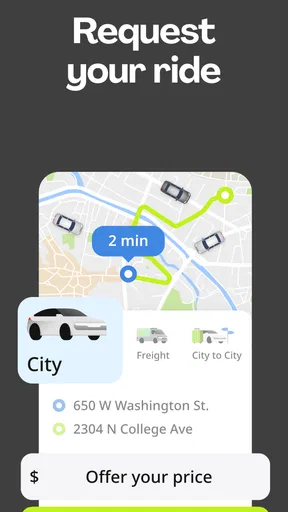
So, here's the deal. When you fire up inDrive, you enter your pick-up and drop-off locations just like you would in any other ride-hailing app. But this is where things get interesting. Instead of just being shown a fare, you get to suggest your own. The driver then has the option to accept, counter, or decline your offer. It’s like haggling at a market, but way more convenient and, honestly, kind of fun!
Once a driver accepts your fare, you get all the usual info—driver's name, car model, and ETA. The whole process is surprisingly streamlined, making it easy even for those who aren't super tech-savvy.
Why You’ll Love It
One of the best things about inDrive is the control it offers. If you're someone who likes to feel in charge of your spending, this app gives you that power. You’re not just a passive passenger; you’re actively involved in the process. Plus, it’s a great way to snag a ride at a price that suits your budget, especially during off-peak hours when drivers are more likely to accept your offers.
And let’s not forget the social aspect. The negotiation process can sometimes lead to brief but friendly interactions that make the ride feel a bit more personal. It's a refreshing change from the robotic experience that can come with other apps.
Features That Stand Out
Beyond the core feature of fare negotiation, inDrive offers a bunch of other handy features:
- Real-time Tracking: Keep an eye on your driver's location as they make their way to you. No more wondering "Where are they?"
- Multiple Payment Options: Pay with cash or card, whatever floats your boat.
- User Ratings: Both drivers and riders can rate each other, ensuring a community of accountability.
These features make the app not just functional but also enjoyable to use. It’s clear that the developers have put thought into what riders and drivers really need.
Challenges and Considerations
Of course, no app is perfect. The negotiation feature, while innovative, can sometimes be a double-edged sword. During peak hours or busy days, you might find it harder to agree on a fare that works for both parties. Patience is key here, and a bit of flexibility doesn’t hurt either.
Another thing to consider is availability. Depending on where you are, the number of drivers using inDrive might be less than other more established apps. It’s something that can improve over time as more people start using the service, but it’s worth keeping in mind if you’re in a hurry and need a ride ASAP.
Lastly, while the app does offer multiple payment options, cash payments might not be everyone's cup of tea, especially if you're used to the no-fuss card payments of other services. But hey, options are always nice to have!
From the first trip to a reliable routine
Once you have completed a first ride, I would use what you learned to make the next request smoother. Remember which pickup points were easy for a driver to reach and which ones were awkward because of a crowded entrance or unclear meeting place. At a station, shopping area, or large building, a nearby street corner can be easier to identify than a vague landmark. A little care with the pickup location can matter as much as the fare, because a driver who cannot find you may turn a simple trip into a frustrating wait.
For an everyday example, imagine leaving work with some flexibility before dinner. You enter the destination, offer an amount you are comfortable paying, then consider a counteroffer against both your budget and how soon you want to leave. If the ride is worth taking at that revised amount, you accept and use the arrival details to meet the driver. If not, you can try another option without having committed to a fare you dislike. This is where the app’s central idea feels most practical: the decision stays visible rather than being hidden behind a single accept button.
It also helps to separate the fare decision from the driver decision. A price that suits you is only one part of choosing a ride; take a moment to review the driver and vehicle information presented after acceptance. Ratings can add useful context, but I would not treat any single score as a complete guarantee. The sensible habit is to check the details, confirm that the car matches what you expect, and make sure you are meeting at the pickup point you selected.
Small habits that prevent avoidable friction
One non-obvious benefit of negotiating is that it encourages you to decide your ceiling before you are under pressure. I find that more useful than repeatedly lowering an offer in the hope that someone will accept it. Set a figure you can stand behind, allow a reasonable response, and then choose whether the trip still makes sense. This keeps the process from turning into a lengthy back-and-forth when you have somewhere to be.
Another useful habit is to think about the whole journey, not only the quoted fare. A slightly higher counteroffer may be worthwhile if it gets you moving when you are short on time; a lower offer may be perfectly reasonable if you can wait. If you are travelling with someone else, agree on the maximum you are willing to pay before requesting the ride. That avoids debating the price while a driver is waiting for your answer.
Tracking is especially helpful after a driver has accepted: use it to coordinate when to step outside rather than waiting at the curb long before the car arrives. At busy pickup spots, keep your phone available and make the meeting point clear. These small choices do not change the fare system, but they make the handoff between booking and boarding less chaotic.
Who should keep it—and who may prefer another option
I think this is a good fit for people who want a say in the fare, are comfortable weighing a counteroffer, and can tolerate some uncertainty about how quickly a driver will accept. It can also suit riders who use more than one ride app and want another way to request a car, especially when comparing a negotiable offer with a fixed-price alternative. Its Everyone age rating makes the intended audience broad, though younger riders should still follow the arrangements and rules set by their household.
I would not make it my only option for a tight airport transfer, an appointment with no late-arrival margin, or a place where driver supply is uncertain. In those situations, speed and predictability may matter more than negotiating. A conventional ride app with a clear displayed fare can be easier when you want to book quickly and avoid deciding what to offer. Public transport, walking, or arranging a lift may also make more sense for a short or time-sensitive trip, depending on the route.
InDrive is not a navigation planner for comparing every way to travel; its value is the ride request and the choice it gives you over the proposed fare. If you expect turn-by-turn route planning, transit directions, or a guaranteed pickup simply because you have entered a destination, you may be looking for a different kind of tool. I would use it for the ride itself, and keep another plan available when the consequences of waiting are high.
What I would check before relying on it
Before a first trip, I would make sure the app is usable in the area where I actually need a ride and that a pickup point is easy to reach. The broad install and rating figures show that many people use it, but a popular app can still have uneven availability from one neighborhood or time of day to another. Testing it on a non-urgent journey is a calmer way to learn how responses feel locally than discovering the process when you are already late.
It is also worth deciding how you prefer to pay before you request, since the choice between cash and card can affect what feels convenient at the end of the ride. If you are used to card-only services, cash as an option may be welcome or may be an extra thing to manage. Either way, check the payment arrangement shown for your ride and avoid assuming that every trip will follow the same routine.
As a first-time user, you do not need to master every detail before booking. The useful sequence is straightforward: enter clear locations, choose a sensible offer, read the driver’s response, and confirm only when the fare and pickup work for you. The part that takes practice is judgment—knowing when to wait, when a counteroffer is fair for your situation, and when another transport option is the better call.
Final Thoughts
All things considered, inDrive is a breath of fresh air in the ride-hailing world. Its fare negotiation feature is a standout, giving you a level of control that other apps simply don’t. While it might not be the perfect fit for every single ride, it’s definitely worth having in your app arsenal, especially if you enjoy a bit of bargaining and want to potentially save some cash.
So, if you’re tired of the take-it-or-leave-it pricing of other apps, give inDrive a whirl. You might just find it’s exactly what you've been looking for to make your rides a little more personal and a lot more affordable!
Privacy and Permissions
See what permissions an app requests and how it handles your data.
- Identity
- find accounts on the device
- Contacts
- find accounts on the device, read your contacts
- Location
- approximate location (network-based), precise location (GPS and network-based)
- Phone
- directly call phone numbers, read call log, read phone status and identity
- Photos/Media/Files
- read the contents of your USB storage, modify or delete the contents of your USB storage
- Storage
- read the contents of your USB storage, modify or delete the contents of your USB storage
- Camera
- take pictures and videos
- Microphone
- record audio
- Wi-Fi connection information
- view Wi-Fi connections
- Device ID & call information
- read phone status and identity
- Other
- view network connections, pair with Bluetooth devices, change network connectivity, disable your screen lock, full network access, change your audio settings, control Near Field Communication, run at startup, reorder running apps, draw over other apps, control vibration, prevent device from sleeping, modify system settings, Google Play license check, read Google service configuration
Verdict
Strengths of inDrive. Rides with fair fares
- User can negotiate fares directly with drivers.
- Wide availability in many cities worldwide.
- Easy-to-use interface for quick bookings.
- Drivers are rated to ensure quality service.
- Option to choose preferred driver type.
Limitations of inDrive. Rides with fair fares
- Limited availability in rural areas.
- No option for immediate cancellation refunds.
- Fares can vary significantly by time of day.
- App may occasionally experience glitches.
- Not all drivers accept fare negotiations.
Similar Picks in This Category
View All
Uber - Request a ride
Uber Technologies, Inc.4.7


Yandex Go: Taxi Food Delivery
Mikromobilnost LLC Belgrade4.8

Bolt: Request a Ride
Bolt Technology4.8

Rapido: Bike-Taxi, Auto & Cabs
Rapido Bike Taxi4.8

Yandex Maps and Navigator
Direct Cursus Computer Systems Trading LLC4.0
You May Also Like
View All
Frequently Asked Questions
What is inDrive and how does it work?
inDrive is a ride-hailing app that offers passengers the ability to negotiate fares directly with drivers, ensuring fair pricing. Users can set their desired trip price, and drivers in the vicinity can accept or counter the offer. This unique feature allows for flexible and transparent pricing tailored to individual needs.
Is inDrive available in my city?
inDrive is expanding rapidly, with availability in numerous cities worldwide. To check if it's available in your location, visit the app’s official website or download the app and enter your city. The app will notify you if services are currently offered in your area.
How does inDrive ensure safety for passengers and drivers?
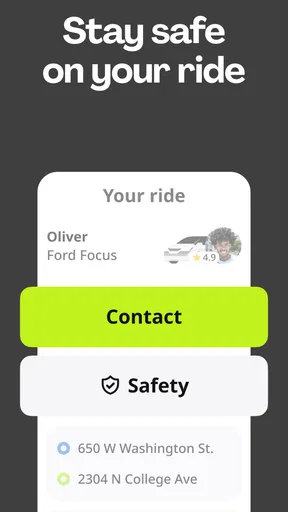
inDrive prioritizes safety by implementing various measures, such as thorough driver verification, real-time GPS tracking, and an in-app emergency button. Passengers and drivers can also rate each other, helping maintain a trustworthy community. The app continues to update its safety features to enhance user security.
What payment options are available on inDrive?
inDrive offers flexible payment options, including cash and digital payments, depending on the city and local regulations. Before the ride begins, passengers can confirm the accepted payment method with their driver, ensuring a smooth and convenient transaction process upon completion of the ride.
Can I schedule a ride in advance with inDrive?
Currently, inDrive operates primarily on an on-demand basis, meaning rides are requested and accepted in real-time. However, users can negotiate for immediate rides and should check the app for any updates or new features that may include ride scheduling in the future.
